Cross-App Access: How an AI Agent Reaches an MCP Server It Doesn't Own
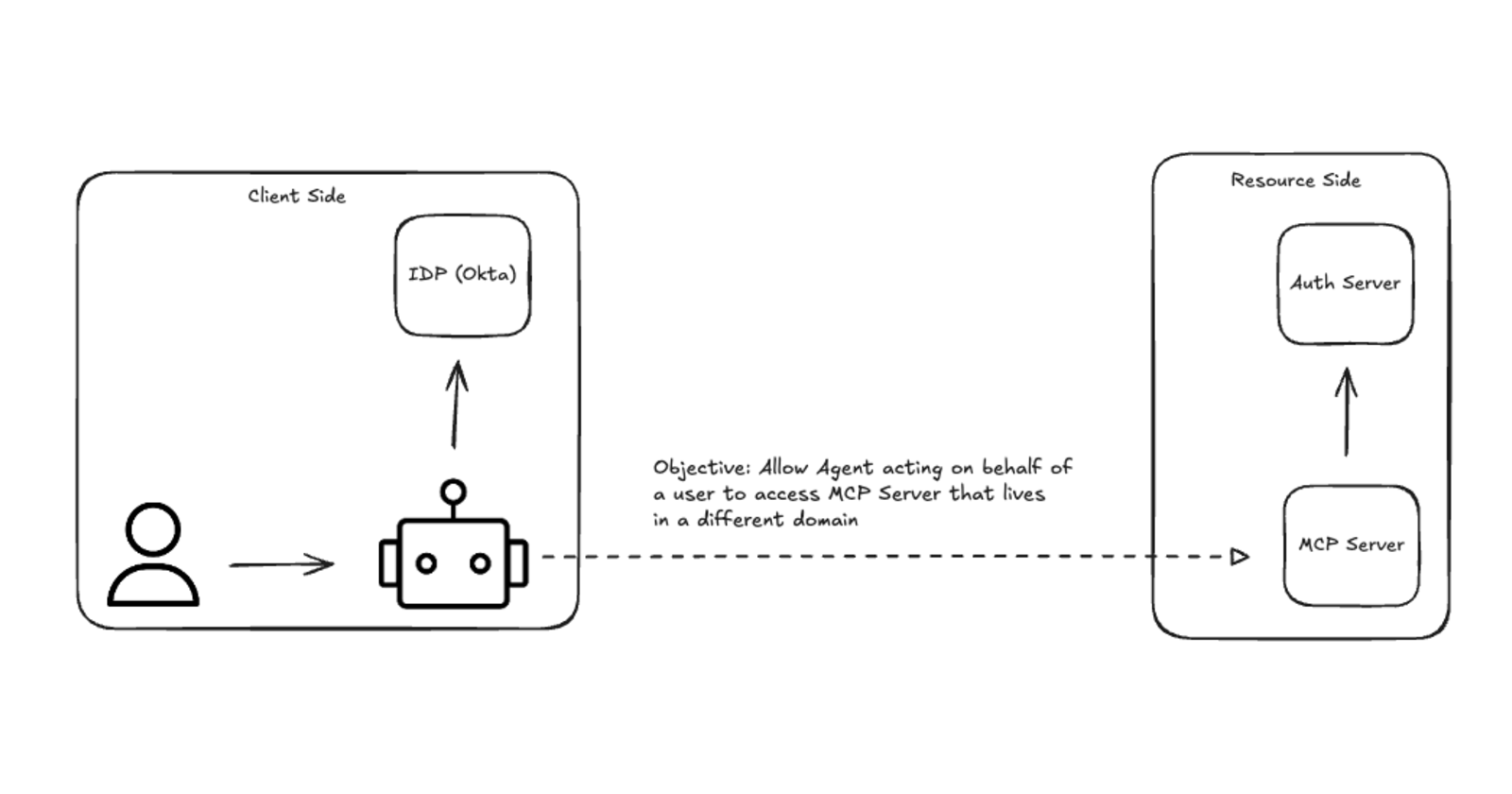
Hooking an AI agent up to an MCP server is easy when you own both ends. It gets messier when the agent is yours, your users sign in through your company's Okta, and the MCP server belongs to someone else - Slack, Jira, GitHub. Who decides the agent is allowed in? Today it's mostly the user, clicking "Allow" on yet another consent screen.
Cross App Access (XAA) moves that decision back to the identity provider. In this post I walk through how it works end to end, using a lab I built with Okta, Claude Code and xaa.dev - including the actual tokens that get passed around.
The Problem
MCP's authorization spec, built on OAuth 2.1, has been the foundation for letting an MCP client access an MCP server on a user's behalf. That works well for individual users, but it starts to break down inside an enterprise:
The organization’s identity provider lacks visibility into the full request. If Karim signs in to Claude Code and then authorizes it to access GitHub through an MCP server, the enterprise identity provider may see the sign-in without seeing the separate decision to grant access to that server.
Access decisions depend on each user. Employees must decide which connections to authorize, while security teams have limited ability to apply consistent policies across the organization.
Consent screens add up. Someone using MCP tools for GitHub, Slack, Google Drive, and an internal database may have to approve each connection separately. And these connections need to be refreshed periodically, which means even more consent prompts.
Cross-App Access
The original MCP OAuth flow didn't depend on where those systems lived: the user, client, and MCP server could all belong to one organization, or the server could belong to an outside provider. Cross App Access focuses on a common enterprise case: the employee signs in through their organization's identity provider, while the external MCP server has its own authorization server This reflects how many teams operate in practice: a single company identity is used to access services such as GitHub, Slack, AWS, and Jira, each of which is managed outside the organization's own identity system.
The diagram below shows the client-side domain under an identity provider (IdP), such as Okta, and the MCP server on the resource side. To access the MCP server, the client needs a token issued by the resource-side authorization server. This is the architecture that ID-JAG is centered around.
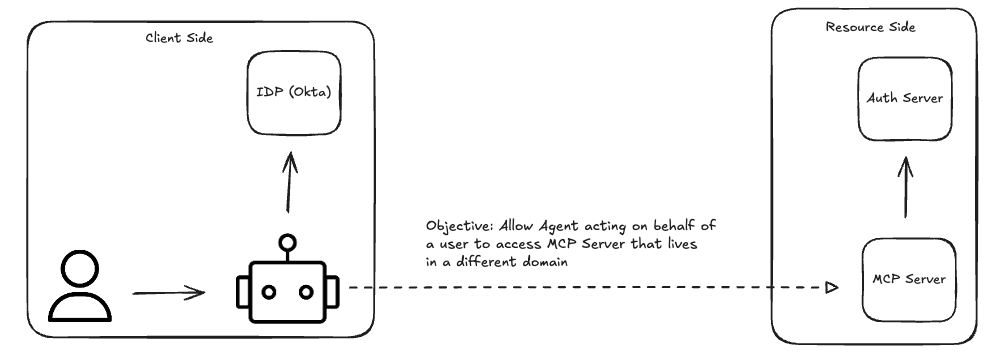
Figure 1. Cross App Access Architecture
Cross App Access goes after exactly these problems:
Put security admins back in control. In the standard MCP OAuth flow, users can authorize access to resources individually, while their organization’s identity provider may have no visibility into those decisions. That can create security gaps similar to shadow IT. With Cross App Access, the identity provider can use resource policies to decide whether a particular agent and user can access a particular MCP server.
Remove consent screens. Once security admins manage access through the identity provider, users no longer need to approve each MCP server connection individually. The authorization happens through a token exchange between the systems, without another user prompt.
How it Works
For my lab I used xaa.dev, a free sandbox from Okta's developer team for testing Cross App Access. Out of the box it runs the whole flow for you - IdP, requesting app, authorization server and protected resource are all pre-configured, so you can watch an ID-JAG get issued and exchanged without setting anything up. The more useful part is that you can swap in your own pieces: bring your own requesting app, your own resource app, or both.
That's what I did. I kept xaa.dev's resource side (the authorization server and the MCP server) and brought my own client side: Okta as the IdP, plus two requesting apps - Claude Code and a simple web app. So everything on the client side of Figure 1 is mine, and everything on the resource side is xaa.dev.
Even if you have no plans to build anything, spend a few minutes on the live demo. You get to watch each token being issued and exchanged, which makes the flow much easier to follow than any diagram - including mine.
Using the same diagram from Figure 1, here's what actually happens end to end.
Say you've built an internal agent that needs to reach external systems — Slack, Jira, whatever the team relies on. The goal is letting the agent's users reach those systems in a way that's secure and governed. The resource being reached is the MCP server in the diagram, and that MCP server only accepts access tokens minted by its own domain's authorization server — Slack's, in this example, not yours.
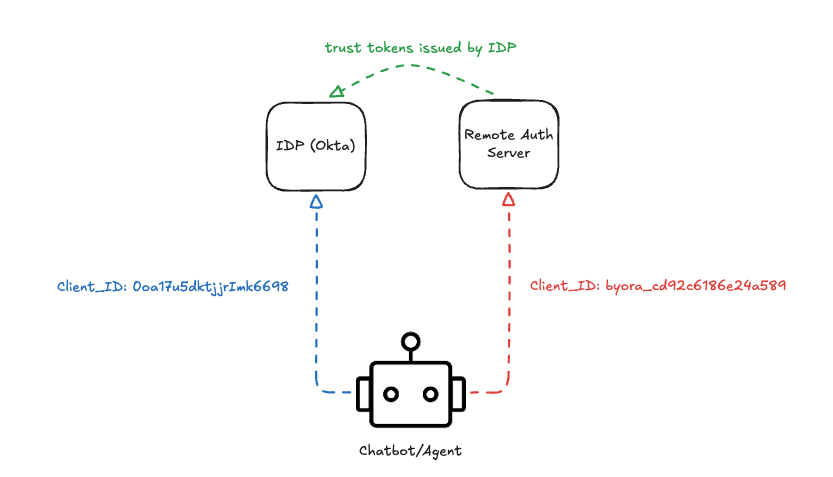
Figure 2. Trust across domains & a local/remote identity for the application/client
Before the first request: trust and client IDs
Two things have to be in place before any of the flow below works.
Trust between domains. This is the most important piece to get right. The remote auth server should only accept tokens issued by your organization's IdP (Figure 2). Otherwise anyone could send an ID-JAG to the remote auth server and walk away with an access token for the MCP server. On xaa.dev this means registering our requesting App with our IdP's issuer URL.
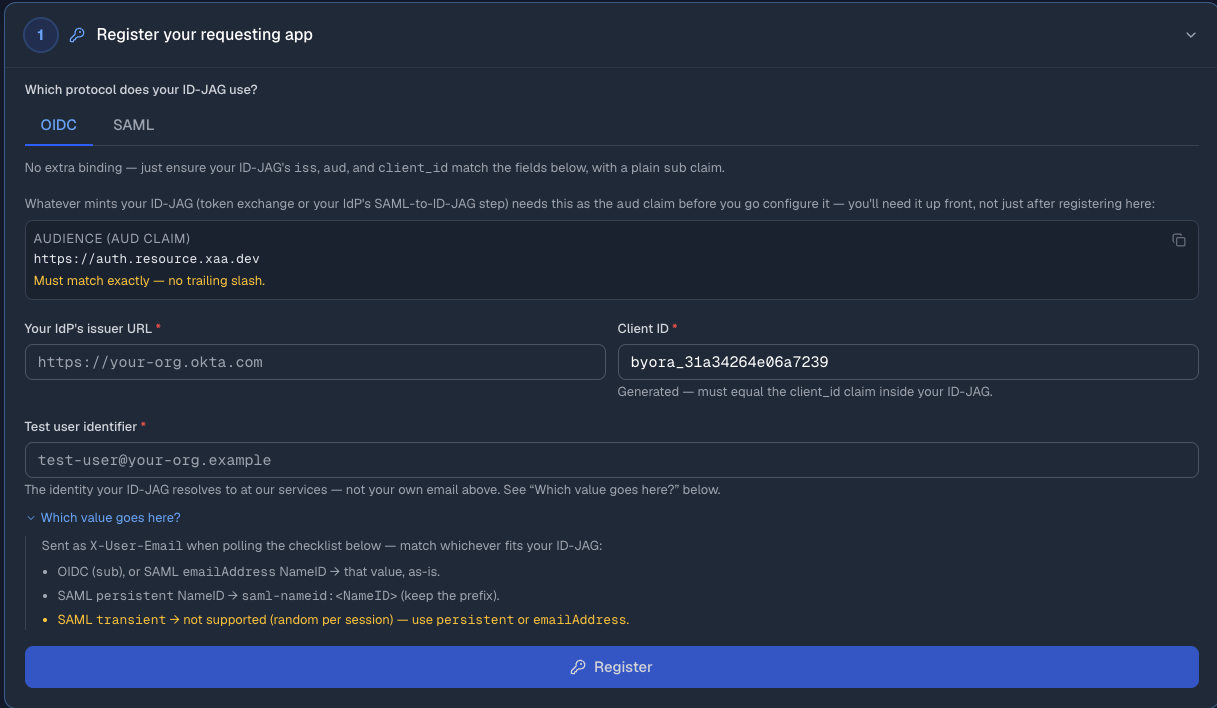
Figure 3. Register your requesting App
Two client IDs. The agent is a client of both your IdP and the remote auth server, and registering with each one gives it a client ID. So the app ends up with two: one on our IdP (blue dotted arrow in Figure 2) and one on the remote auth server (red dotted arrow in Figure 2).
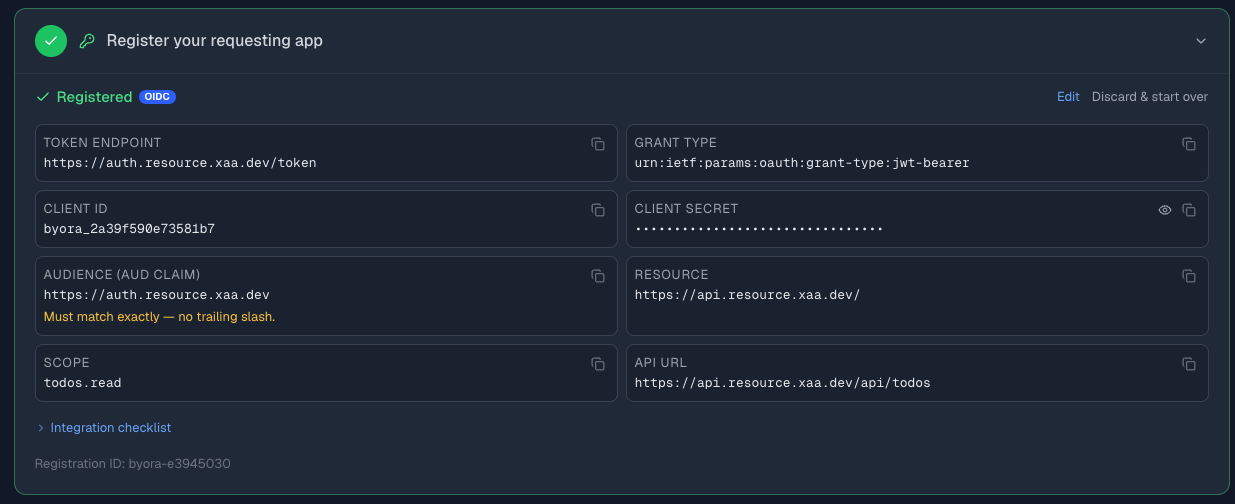
Figure 4. Registered App Details (client ID & secret) for the App on the remote domain
The flow, step by step
- The agent's first request gets rejected. It tries the MCP server with no token, and the server responds that it needs one. Per the MCP spec, the server publishes Protected Resource Metadata (PRM) — a document naming which authorization server issues valid tokens for it. You can see that it exposes the authentication methods required by the auth server.
XAA: discovering PRM for https://mcp.xaa.dev/mcp
XAA: discovered resource=https://mcp.xaa.dev/mcp ASes=[https://auth.resource.xaa.dev/]
XAA: AS issuer=https://auth.resource.xaa.dev/ token_endpoint=[REDACTED] auth_method=client_secret_basic
- The agent checks the authorization server. It reads the named authorization server's own metadata to confirm it accepts ID-JAG:
"authorization_grant_profiles_supported": ["urn:ietf:params:oauth:grant-profile:id-jag"]
- The agent already has an identity token & access token for the user. The user signed into the agent via OIDC earlier, so the agent is already holding an id_token for them
{
  "sub": "00u174oshdsFBe1D0698",
  "name": "Karim Yasmine",
  "email": "karim@example.com",
  "ver": 1,
  "iss": "https://integrator-2929283.okta.com",
  "aud": "0oa17u5dktjjrImk6698",
  "iat": 1790145911,
  "exp": 1790149511,
  "jti": "ID.yy3qhbsrjwAP0bznZTYQCJdR81obRe5fRdRNy17CFrM",
  "amr": [
    "mfa",
    "otp",
    "pwd",
    "okta_verify"
  ],
  "idp": "00o174bodniu63PAF698",
  "preferred_username": "karim@example.com",
  "auth_time": 1790141067,
  "at_hash": "_cL3UArmDSdbD4o51vYVsQ"
}
- The agent asks its own IdP for an ID-JAG. It presents that id_token, its own client credentials, and the target authorization server as the audience, and asks the IdP to mint an ID-JAG — a short-lived, signed assertion scoped to exactly that authorization server. This is where the governance actually happens: Okta has a resource connection policy, and the IdP only mints the ID-JAG if that policy says this agent and this user are allowed to reach this MCP server. With that in mind, here are the fields in the request:
Details on the ID-JAG request below
Grant type is token-exchange - I already have the ID token of the user and my client ID and I am requesting a new token
Subject_token: references the ID Token for a particular user
Request token type: this is where I clearly request an ID-JAG token
Resource: is the MCP Server within the other domain I would like to access (reference Figure 1)
Audience: This token needs to be accepted by the authorization server within the server domain
Scope: this is an optional field - required if the MCP server has a requirement for scopes
#ID-JAG Request
{
  "grant_type": "urn:ietf:params:oauth:grant-type:token-exchange",
  "subject_token": id_token. #
  "subject_token_type": "urn:ietf:params:oauth:token-type:id_token",
  "requested_token_type": "urn:ietf:params:oauth:token-type:id-jag",
  "resource": "https://mcp.xaa.dev/mcp",
  "audience": "https://auth.resource.xaa.dev",
  "scope": "todos.read mcp.access"
}
Details on the ID-JAG Token
Notice the aud - this token is meant to be acted upon by the auth server within the MCP Server domain
Resource: similar to the request this is meant to accept a particular MCP endpoint
#ID-JAG (Token)

{
  "jti": "IDAAG._6RUYGHJ-TCE73T0FpOmegJdKVynYi1MwgvulPmFjQM",
  "iss": "https://integrator-2929283.okta.com",
  "aud": "https://auth.resource.xaa.dev",
  "iat": 1790141794,
  "exp": 1790142094,
  "sub": "00u174oshdsFBe1D0698",
  "resource": "https://mcp.xaa.dev/mcp",
  "email": "karim@example.com",
  "client_id": "byora_cd92c6186e24a589",
  "sub_profile": "user",
  "scope": "todos.read mcp.access",
  "act": {
    "sub": "0oa17u5dktjjrImk6698",
    "sub_profile": "ai_agent web_app"
  }
}
act claim in the ID-JAG from step 4. The ID-JAG carries two identities, and both land at the remote authorization server: sub is me, the user, and act is the agent acting on my behalf - its sub is the agent's client ID in Okta, and its sub_profile labels it as an AI agent. So the authorization server doesn't just know which user is asking - it knows which agent is asking for them, and can factor both into its decision and its logs.- The agent redeems the ID-JAG at the resource's authorization server. It presents the assertion there using a JWT-bearer grant, and gets back an access token the MCP server will actually accept.
{
  "app_org": "byora-e3945030",
  "email": "karim@example.com",
  "jti": "nO8p1D6r4Xc1c-fhtnkTc",
  "sub": "byora-e3945030:00u174oshdsFBe1D0698",
  "iat": 1790146189,
  "exp": 1790149789,
  "scope": "todos.read mcp.access",
  "client_id": "byora_cd92c6186e24a589",
  "iss": "https://auth.resource.xaa.dev",
  "aud": "https://mcp.xaa.dev/mcp"
}
- The agent calls the MCP server with that access token, and this time the request goes through.
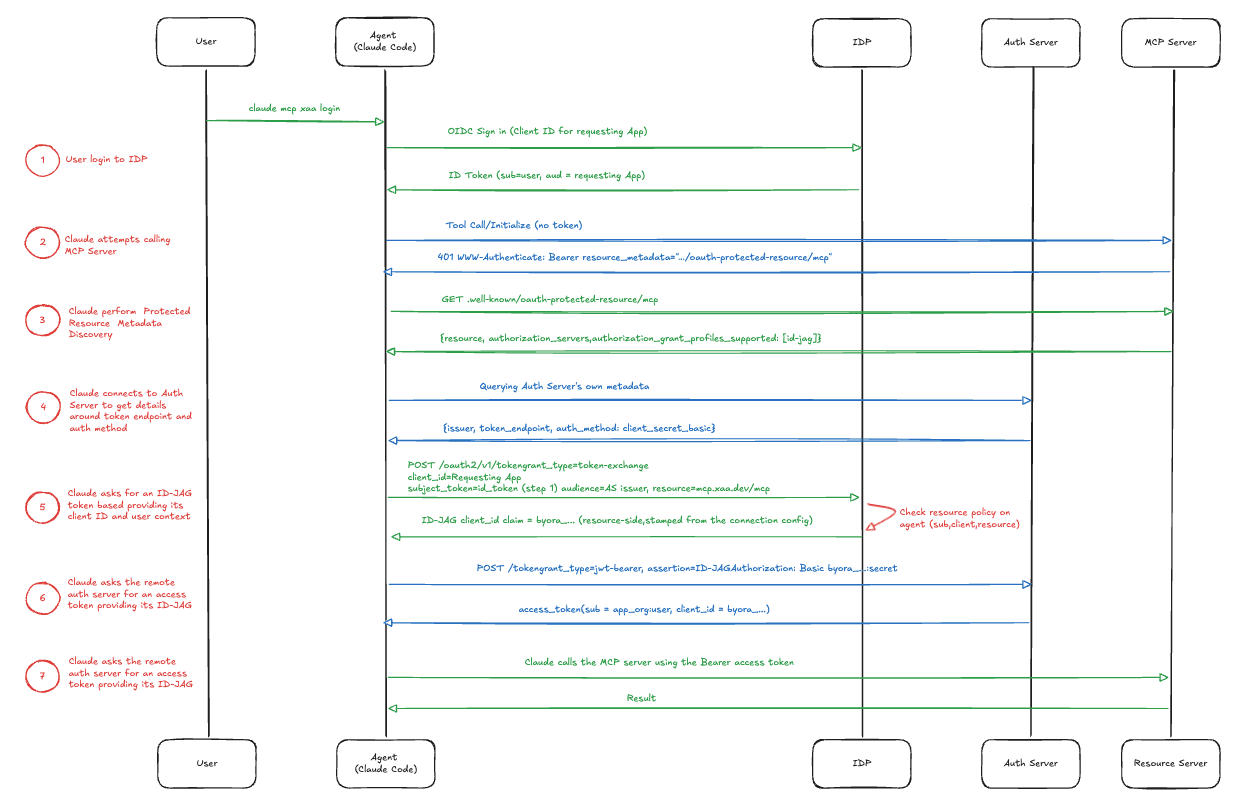
Figure 5. The end-to-end flow, from the user's sign-in to the MCP server call
High Level Configuration
Configuration touches three places: your application clients (Claude Code, your own web app), Okta as the identity provider on the user side, and the resource side. I will only cover the resource side at a high level - recall that I used xaa.dev so I had little configuration on that side.
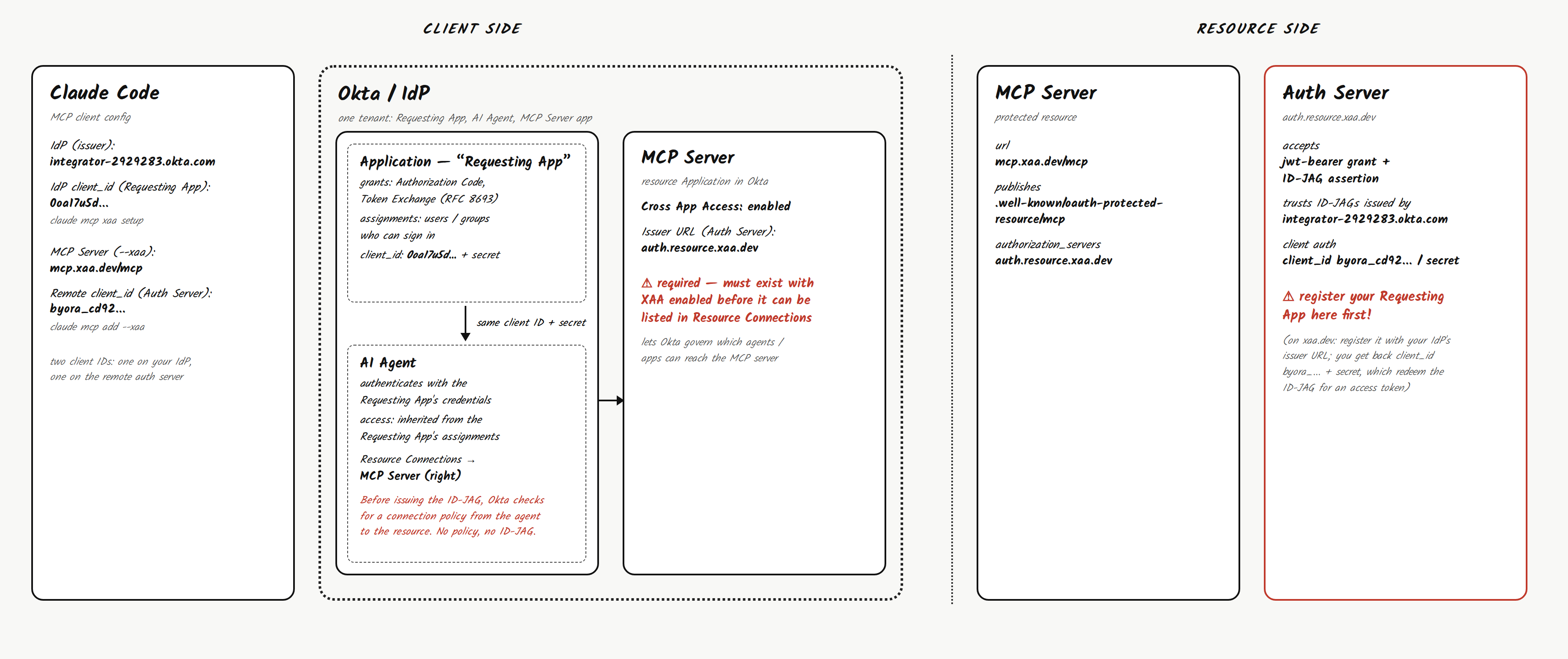
Figure 6. Configuration overview: client side (Claude Code, Okta) and resource side (MCP server, auth server)
Claude Code
For Claude Code, I configured XAA by telling it who the local IdP is (the issuer) and the client ID of the application we defined (the Requesting App). I then added the MCP server with the remote client credentials and flagged that it uses Cross App Access.
claude mcp add --xaa --transport http xaa-mcp https://mcp.xaa.dev/mcp --client-id byora_cd92c6186e24a589 --client-secret
claude mcp xaa setup --issuer https://integrator-2929283.okta.com --client-id 0oa17u5dktjjrImk6698 --client-secret
Okta
First and foremost - we need an App that logs users in via SSO/OIDC. On top of the core grants (authorization code), the important piece is enabling token exchange. This specific client is allowed to use the RFC 8693 token-exchange grant at the /token endpoint — i.e., it's permitted to send a request with grant_type=urn:ietf:params:oauth:grant-type:token-exchange, presenting one token (the id_token) and asking to receive a different one back (the ID-JAG) in exchange.
Obviously you need to have users or groups assigned to this App so they can sign in - this is under assignments.
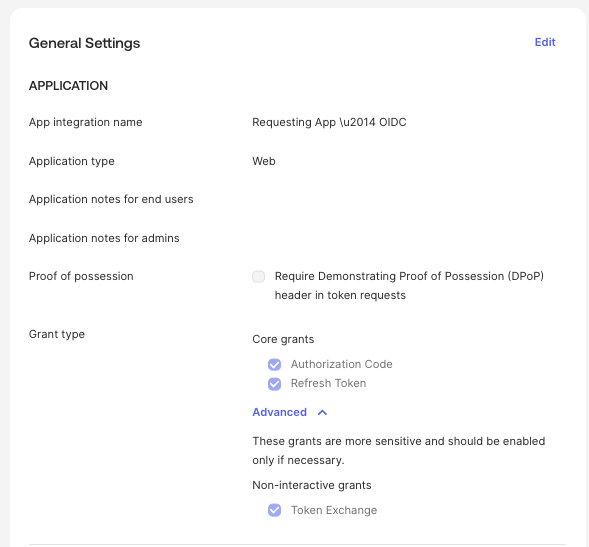
Figure 7. The Requesting App in Okta, with Token Exchange enabled
In Okta - we also need to define the resource application i.e. the MCP Server we need to access. The reason is simple: once it's defined as a resource, Okta can govern which agents/applications are allowed to access it.
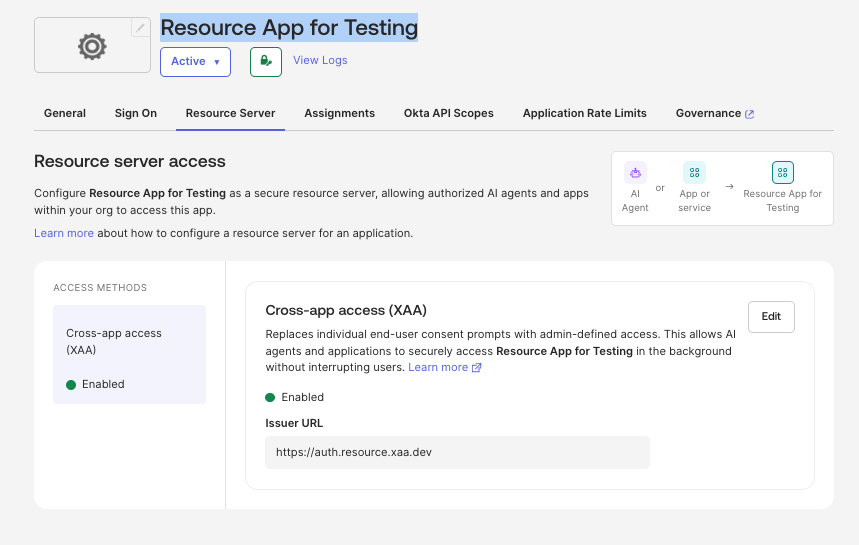
Figure 8. The MCP server defined as a resource in Okta, with Cross-app access (XAA) enabled
The agent is using the client credentials of the Requesting App, so it authenticates to Okta with the same client ID and secret rather than an identity of its own.
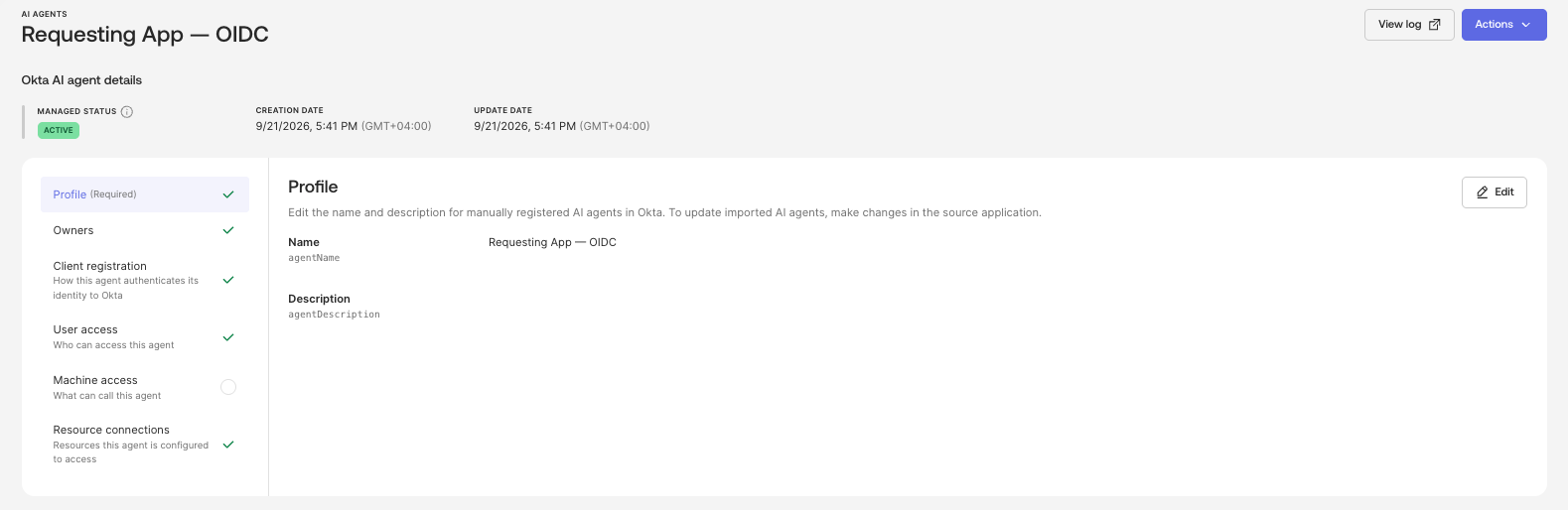
Figure 9. The AI agent registered in Okta, linked to the Requesting App
The agent's access is the same as the Requesting App's access, which again depends on which users or groups are assigned to the application. In practice: if a user isn't assigned to the app, the agent can't act for them either.
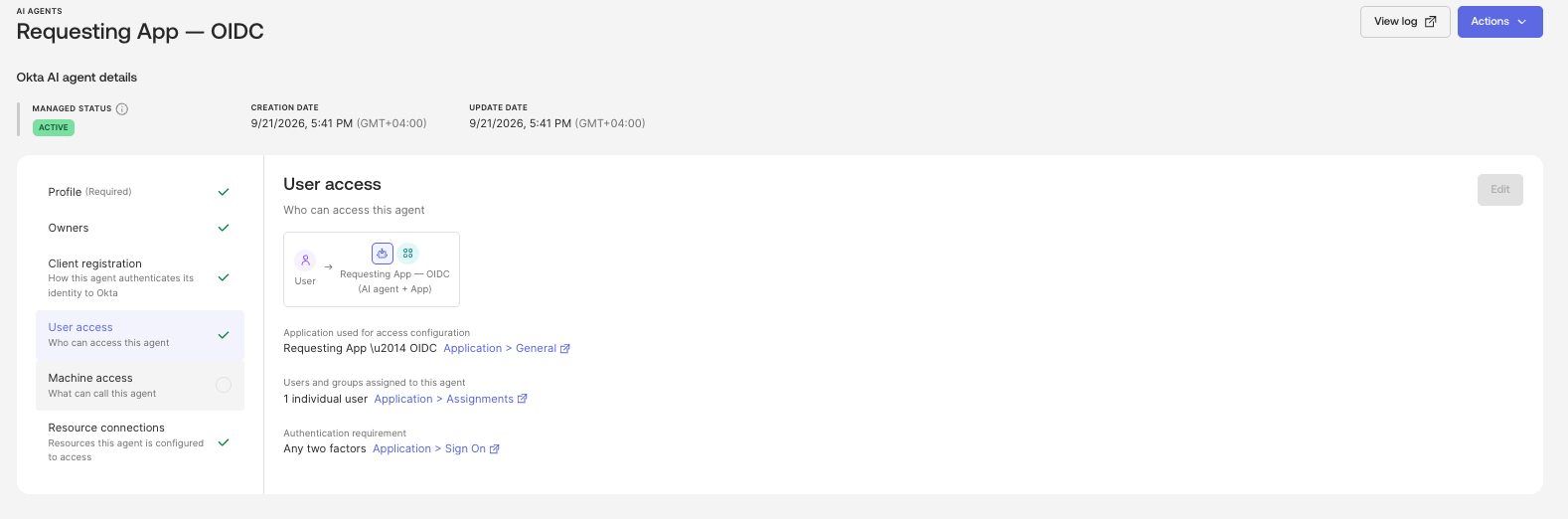
Figure 10. User access for the agent, inherited from the Requesting App's assignments
This is the most important screen in the whole setup. It lists the resources this agent is allowed to request an ID-JAG for. If the MCP server isn't listed here, Okta refuses the token exchange in step 4 - that's the policy check we talked about earlier. It's also why we created the MCP Server as an application in Okta and enabled Cross App Access (XAA) on it: it has to exist in Okta before it can be listed.
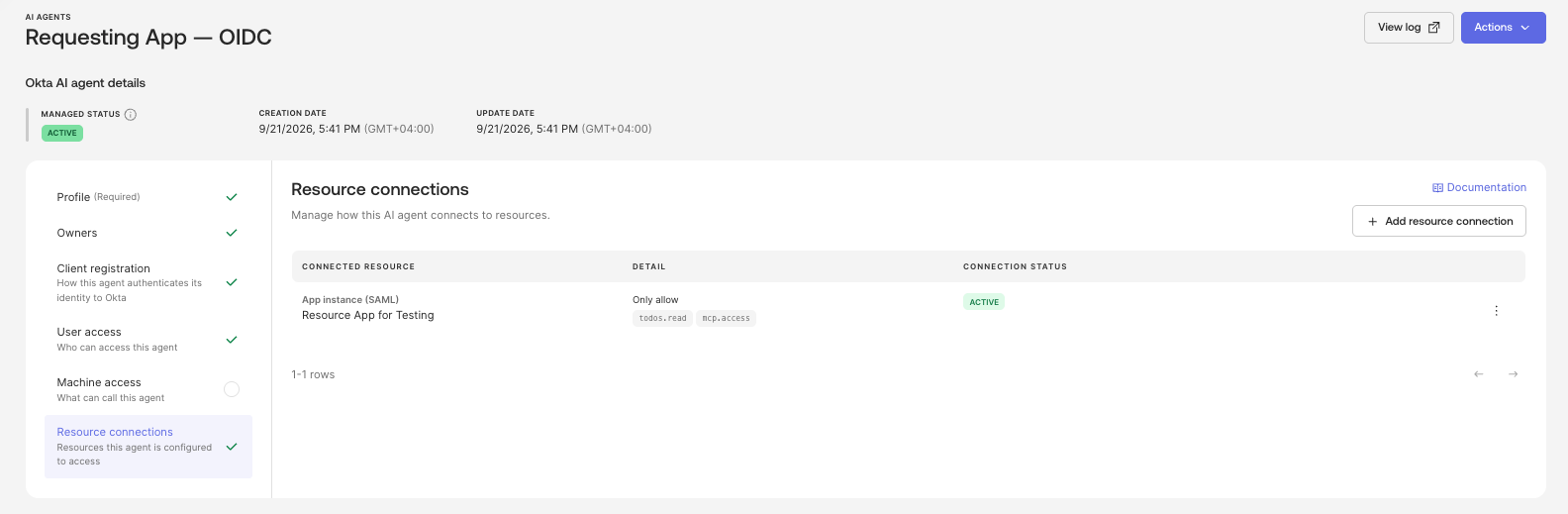
Figure 11. Resource connections: the MCP server this agent is allowed to reach
Authorization Server (Resource)
As mentioned above, the two things that matter most on the resource side are:
Configuring trust i.e. the authorization server should be configured to accept tokens that are issued by the IDP.
Configuring a Client ID for the Apps within your environment to represent those Apps within the remote environment.
Claude Code Authentication
Here's what this looks like from the user's side. Claude Code connects and authenticates to the MCP server without a single browser redirect or consent screen - which is exactly the problem we started with.
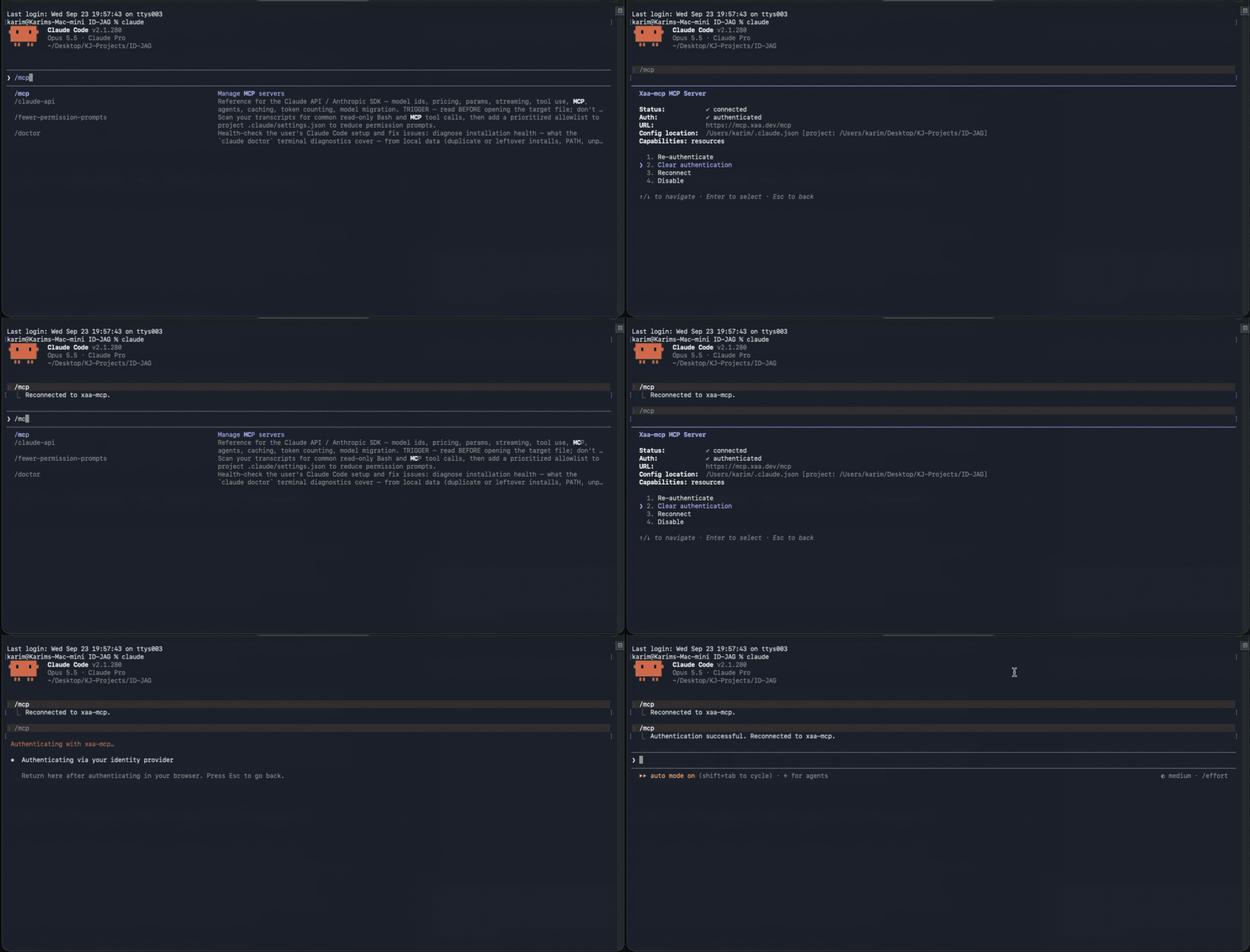
Figure 12. Claude Code connected and authenticated to the MCP server - no redirect, no consent screen
Wrapping Up
The nice thing about XAA is that nothing here is exotic. It is a token exchange at your IdP, followed by the agent handing that ID-JAG to the remote auth server and getting an access token back (the JWT-bearer grant). What changes is who makes the call. Instead of every employee clicking "Allow" on a consent screen for every MCP server, the decision sits in an Okta policy where the security team can actually see it and manage it.
If you want to try this yourself, xaa.dev takes care of the resource side, so you can focus on wiring up your IdP and your agent. That's the part where you'll learn the most anyway.


